Using DineKit outside the UK
Set your country, currency and allergen display for your own market — plus the one payment limitation to know about before you rely on it.
DineKit started as a UK plugin, and some of that heritage is still visible — the 14 statutory allergens it pre-installs are the Natasha’s Law list. But the plugin itself is not UK-only. You can set your own country, your own currency and the way allergens are presented, and the dashboard adapts its wording to match where you actually are.
This guide covers what changes when you set your country, and — just as importantly — the one thing that is still UK-shaped.
Before you start
- DineKit installed and active — see Getting started.
- Your restaurant’s address to hand, since it feeds local search results.
Step by step: set your country and currency
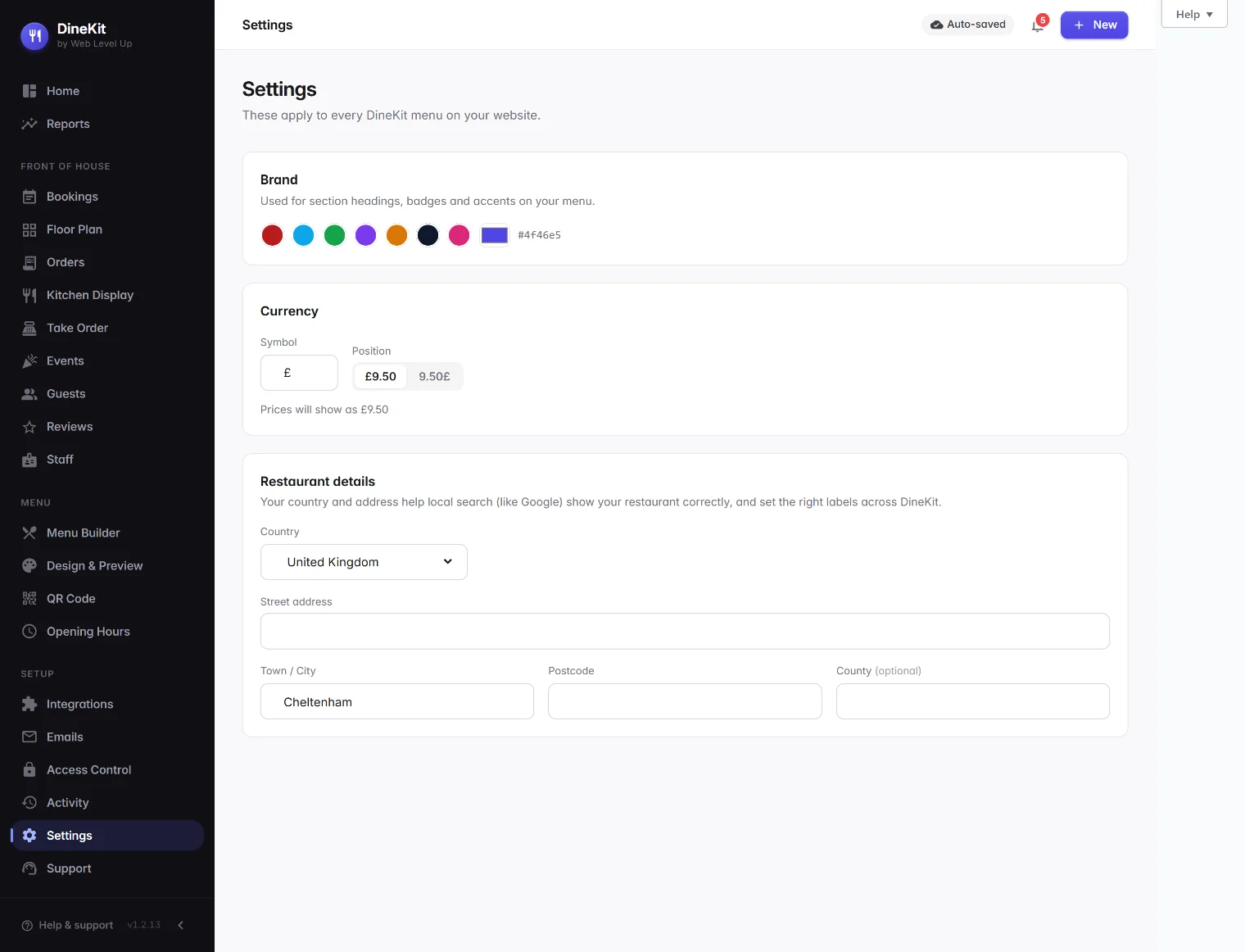
- Open Settings. In DineKit, choose Settings from the Setup group in the sidebar.
- Pick your country from the list. DineKit ships with around forty countries across the UK and Ireland, Europe, North America, Australia and New Zealand, and a spread including India, Singapore, the UAE, South Africa, Mexico, Brazil and Japan.
- Fill in your address. Notice that the form’s own labels change as soon as you pick a country — it asks for a ZIP code and a State in the United States, a Postcode and a County in the UK, a Province in Canada, and a Postal code and Region elsewhere. You are never asked for a “postcode” in a country that doesn’t call it that.
- Set your currency symbol. Type the symbol you use — £, $, €, ₹, R, ¥ or anything else. It is a free text field, so you are not limited to a fixed list.
- Choose where the symbol sits. Some currencies lead ($9.50), others trail (9,50 €). Pick whichever is normal where you are; there is a live preview showing exactly how a price will read.
- Save. The currency applies immediately across the public menu, ordering, the till and your reports — everywhere a price appears.
Allergens outside the UK
DineKit pre-seeds the 14 allergens that UK and EU law requires, because that list covers a great many countries either exactly or nearly. The 14 are protected from renaming and deletion so nobody can accidentally break their own compliance.
If your country regulates a different list, you are not stuck:
- Add your own allergens as you need them. Sesame, mustard or anything else specific to your market can be added, and DineKit warns you if you try to delete one that is still in use on a dish.
- Choose how they display to diners — as icons, as full text, or as short codes. Different jurisdictions and different menu styles present allergens differently, and this is deliberately flexible rather than fixed.
See Allergens and the allergen matrix for how tagging works.
Local search and your address
The address you enter is not just decoration. DineKit publishes it as structured data on your site so search engines can understand where your restaurant is, what type of business it is and when it is open. That is what helps you appear when somebody nearby searches for a place to eat.
Your opening hours feed the same structured data, so it is worth setting those properly — see Opening hours.
Language
Every string in DineKit is internationalised, which means the plugin can be translated. If your WordPress site is running in another language and a translation exists for it, DineKit will use it. If no translation exists yet for your language, the interface stays in English until one is contributed.
One honest limitation: card payments are charged in GBP
This is the part that has not caught up with the rest, and it is better that you know now than discover it later.
Menu display, currency symbols, allergens, addresses and the whole dashboard are localised. Card payments taken through DineKit’s Stripe integration are captured in GBP today. Your menu can display prices in dollars, euros or rupees, but the actual charge going through Stripe is still in pounds.
What that means in practice:
- If you are outside the UK and don’t take card payments through DineKit — you take cash, or card on your own separate terminal — everything else works normally and this does not affect you.
- If you are outside the UK and want DineKit to take the card payment, wait for multi-currency capture before relying on it, or your guests will see a currency conversion they did not expect.
Everything else on this page is live today. This one is a genuine gap, not a setting you have missed.
Tips
- Set your country before you build the menu. It costs nothing to change later, but the address labels and currency being right from the start avoids re-checking every price.
- Match the decimal convention your guests expect when you write prices, and use the symbol position to match local habit.
- Check the allergen list against your own regulator rather than assuming the pre-seeded 14 is complete where you are. It is a strong starting point, not legal advice.