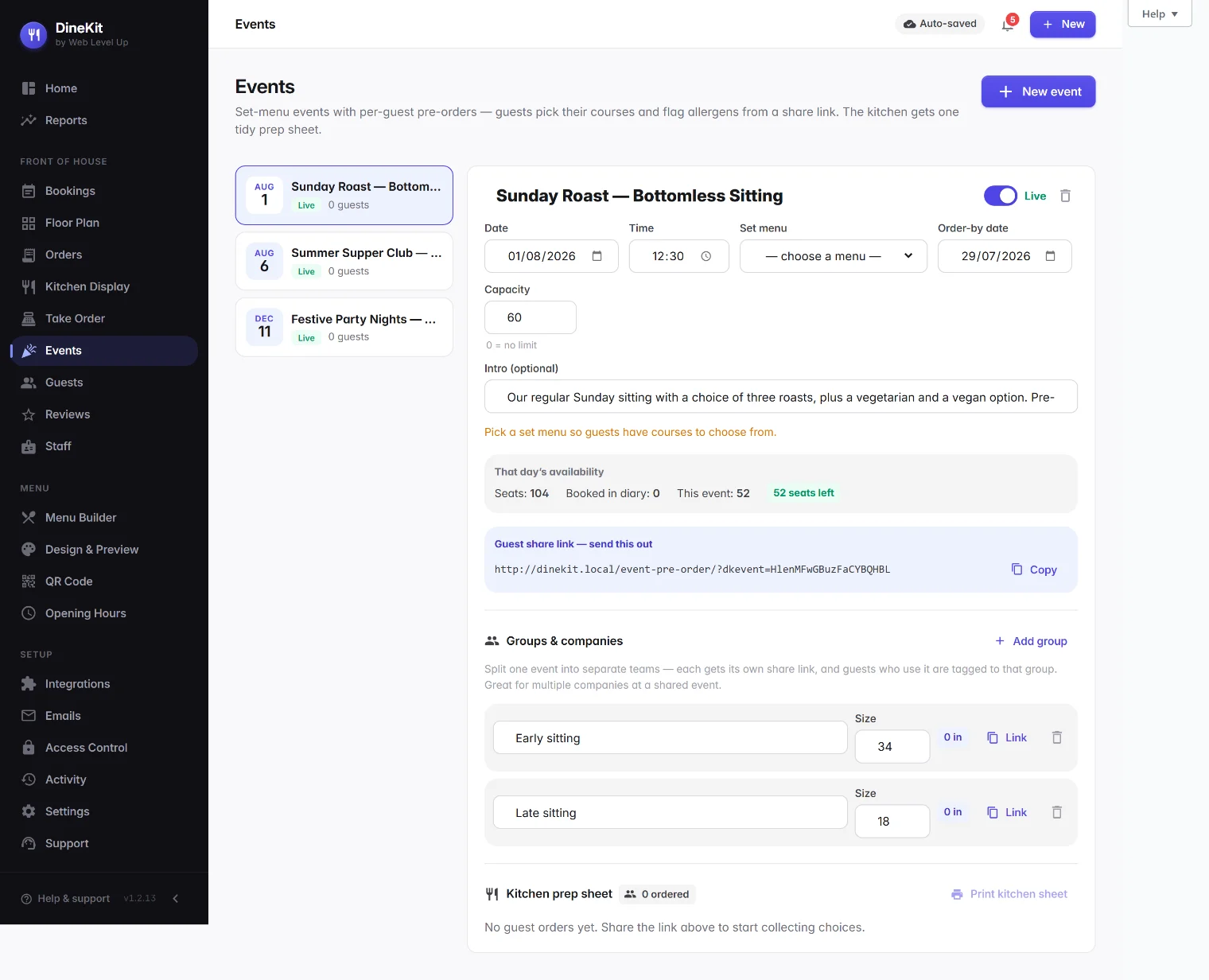
Big group booked in? Create a set-menu event, send every guest a private link to pick their courses and flag their own allergens, and print one clean prep sheet for the kitchen. No paper forms, no chasing choices by email, no guessing quantities on the night. Free, and it lives on your own website.
A party of twenty-four books in for a Christmas set menu. Lovely. Then the admin starts. You email a PDF pre-order form to the organiser. The organiser forwards it round. Choices trickle back over a fortnight — some as a reply-all, some as a photo of a scribbled sheet, two as “same as Dave but no mushrooms”. Three people never respond and you have to chase them twice.
Then you rebuild all of it by hand into a spreadsheet so the kitchen knows it needs fourteen beef, six salmon and four nut roast. Somewhere in that retyping, an allergen gets dropped. And that is the part that keeps this off the “minor annoyance” pile: a missed allergen is not a wrong garnish, it is a safety incident. Under Natasha’s Law and UK allergen rules you are responsible for getting all fourteen right, per guest, every time — and a mistake on a busy December service is exactly when it slips.
Paper forms and spreadsheets were never built for this. They scatter the information across a dozen inboxes, they put the retyping (and the errors) on you, and they leave the kitchen working off a document that is out of date the moment one guest changes their main.
DineKit is a free, open-source WordPress plugin that runs your bookings, menus, allergens and ordering from your own site. Its events feature is built for exactly this job — the pre-ordered group.
You create an event and link it to a menu. Because a DineKit menu is already organised into sections, those sections become your courses — starters, mains, desserts — automatically. Every guest gets their own magic link: a private share page, no login, no account. On it they pick one dish per course and flag their own allergens and dietary needs against the full UK-14 list. The choices land straight in your admin — no retyping, no forwarding, no PDF.
When you are ready for the kitchen, DineKit builds a single consolidated prep sheet: a count of every dish (so the section knows it is fourteen beef, six salmon, four nut roast) plus an allergen-to-guest map so the pass can see, at a glance, who at the table needs what. You print it and it goes up. That is the whole point — the guests do the data entry, and DineKit does the sums.
Grounded in what DineKit actually does today — nothing invented, nothing you need to buy.
Create an event and link a menu. The menu’s sections become the courses guests choose from, so your festive or group menu is ready the moment you build it.
Every guest gets their own share link to pick their courses. No app, no account, no login — they tap, they choose, they are done.
Each guest flags their own UK-14 allergens and dietary needs on their page, so the information comes straight from the person who actually knows it.
DineKit consolidates every choice into dish counts plus an allergen-to-guest map you can print — one clear sheet for the section instead of a rebuilt spreadsheet.
Running a shared event for several firms or teams? Split it into groups, each with its own share link, so every company self-manages its own guests’ choices.
Events appear in the bookings diary and the full-width service timeline with expected covers, so a big party is never a separate thing you might forget.
The event editor shows that day’s room — seats, what’s already booked in the diary, this event, and how many seats are left — so you can say yes or no on the phone with confidence.
It all runs on your WordPress site. No per-cover fees, no commission, no third-party portal between you and your guests.
The same job, done two ways. One puts the work on you; the other puts the choosing on the guest and the maths on the software.
| What you need | DineKit | Paper & spreadsheets |
|---|---|---|
| Cost | Free, on your own site | “Free” but hours of admin per party |
| Guests choose their own courses | Each guest picks via a private link | Organiser collects and relays choices |
| Allergens captured per guest | Flagged by the guest against the UK-14 | Scattered across replies, retyped by you |
| Automatic kitchen prep sheet | Dish counts + allergen-to-guest map, printable | You rebuild the totals by hand |
| Several companies in one event | Per-group share links, self-managed | One thread everyone replies over |
| Lives with your bookings | Shows in the diary and timeline | A separate document off to the side |
| Changes near the date | Guest updates their link; totals recalculate | Manual re-count, easy to miss |
December is where this earns its keep. Christmas parties, work dos and end-of-term dinners all land in the same few weeks, all on set menus, all needing pre-orders — and all at the point in the year when your team has the least time to spare for chasing forms. A guest-fills-it-in system is the difference between a calm December and a fortnight of inbox archaeology.
But the same event lives beyond the party season. Wedding breakfasts, christenings, milestone birthdays, corporate lunches, supper clubs and any fixed-menu group booking work the same way: one event, one link per guest, one prep sheet. Build your festive menu once, run it as an event for every party that books it, and reuse the whole approach for the private dining you do in January and beyond.
The safest allergen information is the information that comes straight from the person who has the allergy. When an organiser relays “a couple of them are gluten-free” you have lost the detail — which two, and whether it is coeliac-serious or a preference. When each guest flags their own needs against the full UK-14 list on their own page, nothing is paraphrased and nothing is lost in a forwarded email.
Because DineKit already powers your everyday allergen menu, events use the same fourteen-allergen framework you use across the site — so an event is not a bolt-on with its own rules, it is your existing allergen handling applied to a group. And because the prep sheet maps allergens to named guests, the kitchen and pass are not reading a general warning; they can see exactly which cover on the table needs the gluten-free plate. That is the map you want in your hand on a busy service, not a note that says “one GF somewhere”.
Events sit alongside the rest of DineKit: take the reservation with table booking, keep every guest’s allergens and history in your guest CRM, publish a compliant allergen menu, and let people order for collection or delivery with online ordering — all free, all on your own website.
DineKit is free, self-contained and live in minutes. Own your menus, your bookings and your data.
Get DineKit — FreeWe use essential cookies to run this site and, with your consent, Google Analytics to see how it's used. See our Cookie Policy.